Quick Ranked-Choice Elections with Google Forms
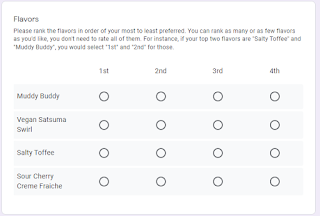
Want to run a really quick ranked-choice election, like "which restaurant should we go to" or "where should we ask the city to build a crosswalk" ? See here for an example: Here's one way to do it: Create a new Google Form. In the form description, explain each of the choices. Add a "multiple choice grid" question. In the "rows" of the question, add one row for each choice: "Chocolate", "Vanilla", etc. In the "columns" of the question, add a "rank number" for each choice: "1st", "2nd", etc. In the "three dots" menu at the bottom-right of the question, turn on "limit to one response per column": Send out the form and wait for people to vote. Once the votes are in, go to the "Response" tab of the form and export the ballots to a CSV using the option under the "three dots" menu: Download ballots.py and pip install ...